
Unveiling the Power: A Deep Review of New NVIDIA Graphics Cards
Explore the latest NVIDIA GPUs, their groundbreaking features, and real-world performance to guide your ultimate hardware decision.
Discover Your Next GPUKey Takeaways
- ✓ NVIDIA's latest generation of graphics cards introduces significant architectural advancements.
- ✓ Ray Tracing and DLSS technologies continue to be central to NVIDIA's performance leadership.
- ✓ The new cards offer substantial performance gains across gaming, content creation, and AI workloads.
- ✓ Power consumption and pricing remain key considerations for potential buyers.
How It Works
NVIDIA's new GPUs leverage advanced architectures, such as Ada Lovelace or Hopper, featuring more efficient Streaming Multiprocessors (SMs) and specialized cores. These improvements enable higher clock speeds and greater processing parallelism, leading to substantial performance boosts.
Dedicated RT Cores and Tensor Cores are at the heart of NVIDIA's superior ray tracing capabilities and AI-powered features like DLSS (Deep Learning Super Sampling). Newer generations bring more powerful and efficient versions of these cores, rendering more realistic lighting and upscaling resolutions with minimal performance impact.
The latest cards often feature faster and larger VRAM capacities, typically GDDR6X, alongside refined memory controllers and increased cache. This ensures that even the most demanding games and professional applications have ample bandwidth and storage for high-resolution textures and complex scene data.
Beyond hardware, NVIDIA's extensive software ecosystem, including Game Ready Drivers, Studio Drivers, NVIDIA Broadcast, and Reflex, plays a crucial role. These optimizations and tools enhance user experience, reduce latency, and unlock the full potential of the new graphics cards across various applications.
Unpacking the NVIDIA GPU Architecture: Ada Lovelace and Beyond
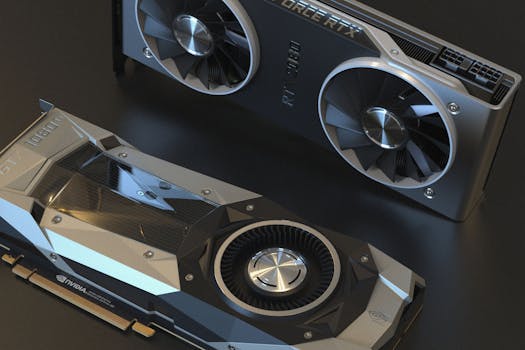 Photo: Nana Dua / Pexels
Gaming Performance Benchmarks: A Deep Dive into Real-World Frames Per Second
 Photo: Rajat Yadav / Pexels
Creative and Professional Workloads: Beyond Gaming with NVIDIA Studio
 Photo: Pachon in Motion / Pexels
Choosing Your Next NVIDIA GPU: Tips and Common Mistakes to Avoid
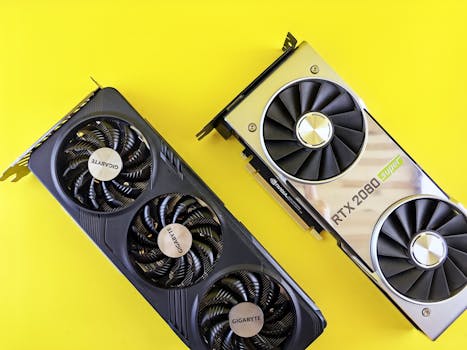 Photo: Andrey Matveev / Pexels
Comparison
| Feature | RTX 4090 | RTX 4080 SUPER | RTX 4070 Ti SUPER |
|---|---|---|---|
| Architecture | Ada Lovelace | Ada Lovelace | Ada Lovelace |
| CUDA Cores | 16384 | 10240 | 8448 |
| VRAM | 24GB GDDR6X | 16GB GDDR6X | 16GB GDDR6X |
| Memory Bus | 384-bit | 256-bit | 256-bit |
| DLSS 3 Support | ✓ | ✓ | ✓ |
| Ray Tracing Performance | Excellent | Very Good | Good |
| Gaming (4K Ultra) | Exceptional | Excellent | Very Good |
| Creative Workloads | Top Tier | High End | Mid-High End |
What Readers Say
"This review of new NVIDIA graphics cards helped me understand the DLSS 3 frame generation perfectly. My new RTX 4080 SUPER is a beast, running everything at 4K with ease."
Alex P. · Seattle, WA"I was torn between two cards, but this detailed review comparing gaming and professional performance made my decision easy. My rendering times have drastically improved with the RTX 4090."
Maria G. · Austin, TX"The section on VRAM requirements was particularly helpful. I upgraded my old card based on this review and now my 4K gaming experience is buttery smooth, no more stuttering."
Ben K. · Miami, FL"Great overview of the new NVIDIA GPUs. While the high-end cards are out of my budget, the tips on avoiding bottlenecks helped me optimize my current setup and plan for a future upgrade."
Chloe L. · Denver, CO"As a data scientist, the insights into Tensor Cores and AI acceleration were invaluable. This review confirmed my choice for an NVIDIA card for my deep learning projects."
David R. · Boston, MAFrequently Asked Questions
What are the most significant improvements in the new NVIDIA graphics cards?
The most significant improvements include the new Ada Lovelace architecture with vastly increased CUDA, RT, and Tensor Cores, leading to substantial performance gains in rasterization and ray tracing. DLSS 3 with Frame Generation is a standout feature, using AI to generate entirely new frames for unprecedented frame rate boosts.
Are the new NVIDIA GPUs worth the upgrade if I have a previous generation card?
For users with RTX 30-series cards, the upgrade depends on your resolution and performance targets. For 4K gaming or demanding professional workloads, the performance uplift, especially with DLSS 3, can be very compelling. If you're coming from an older generation (e.g., RTX 20-series or GTX 10-series), the upgrade is generally a massive leap in performance and features, making it highly worthwhile.
How does DLSS 3 (Frame Generation) work and what are its benefits?
DLSS 3 uses AI to analyze two consecutive game frames and motion data to generate an entirely new, interpolated frame. This process happens on the GPU's Tensor Cores and can effectively double frame rates in supported games, significantly improving smoothness and responsiveness, especially at high resolutions and with ray tracing enabled.
What is the typical power consumption of these new NVIDIA graphics cards?
Power consumption varies significantly by model. High-end cards like the RTX 4090 can have a Total Graphics Power (TGP) of 450W, while mid-range cards are typically in the 200-300W range. It's crucial to check the specific card's TGP and ensure your Power Supply Unit (PSU) can comfortably meet its requirements, along with the rest of your system.
How do NVIDIA's new cards compare to AMD's latest offerings?
NVIDIA's new cards generally maintain a lead in ray tracing performance and offer the unique advantage of DLSS 3 with Frame Generation. AMD's cards often compete strongly in traditional rasterization performance, sometimes offering better price-to-performance in that specific metric, and have their own upscaling tech (FSR). The choice often comes down to specific game optimizations, feature preferences (like DLSS vs. FSR), and budget.
Who should consider buying these new NVIDIA graphics cards?
These cards are ideal for serious gamers aiming for high-refresh-rate 1440p or 4K gaming, competitive esports players seeking maximum frames and low latency, and creative professionals (video editors, 3D artists, streamers) who need powerful acceleration for their workflows. Data scientists and researchers also benefit greatly from their AI and compute capabilities.
Are there any compatibility issues I should be aware of with new NVIDIA GPUs?
The main compatibility concerns are physical size (these cards can be very large, requiring ample case space), power supply wattage and connector types (many high-end cards use the 12VHPWR connector), and ensuring your CPU is not a significant bottleneck. Always verify these aspects before purchasing.
What future trends can we expect from NVIDIA's graphics card development?
Future trends will likely include continued advancements in AI integration for graphics (e.g., more sophisticated DLSS versions, AI-driven asset generation), further improvements in ray tracing efficiency, and potentially new memory technologies. We can also expect ongoing optimization for virtual reality and augmented reality, alongside efforts to improve power efficiency further.
Ready to elevate your gaming and creative pursuits? Explore our detailed review of new NVIDIA graphics cards and make an informed decision for your next powerful upgrade, ensuring you choose the perfect GPU for unparalleled performance and innovation.