 Photo: Atahan Demir / Pexels
How to Build a Gaming PC: Your Ultimate DIY Guide
Unlock unparalleled performance and customization by assembling your own gaming rig, perfectly tailored to your needs and budget.
Start Building Your Dream PCKey Takeaways
- ✓ Building a gaming PC can be more cost-effective than buying pre-built.
- ✓ You gain full control over component selection for optimal performance.
- ✓ The process is surprisingly straightforward with proper guidance.
- ✓ A custom-built PC offers easier upgrades and maintenance.
How It Works
Determine your performance goals (e.g., 1080p, 1440p, 4K gaming) and set a realistic budget for components. Research compatible parts that meet your needs.
Purchase all necessary hardware, including CPU, GPU, motherboard, RAM, storage, PSU, and case. Ensure you have essential tools like screwdrivers and zip ties.
Install the CPU, cooler, RAM, and M.2 SSD onto the motherboard outside the case. This 'test bench' approach helps identify any immediate issues before full assembly.
Mount the motherboard, install the GPU, connect the power supply, and route all cables neatly within the case. Install the operating system and drivers.
Why Building Your Own Gaming PC is the Smart Choice
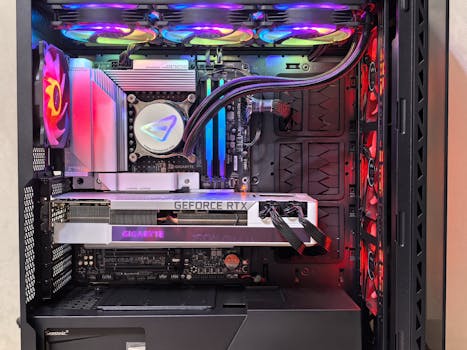 Photo: Andrey Matveev / Pexels
Essential Components: What You Need to Know
 Photo: Ron Lach / Pexels
Step-by-Step Assembly: Bringing Your Vision to Life
Optimization and Troubleshooting: Fine-Tuning Your Gaming Rig
Common Mistakes and Expert Tips for First-Time Builders
- **Read the Manuals:** This cannot be stressed enough. Every component, especially your motherboard, comes with a detailed manual. It contains crucial information about installation, header locations, and troubleshooting codes.
- **Watch Build Videos:** Complement your manual reading with visual guides. Watching experienced builders assemble PCs can demystify the process and show you best practices.
- **Ground Yourself:** Static electricity can damage sensitive components. Use an anti-static wrist strap or regularly touch a grounded metal object (like your PC case) to discharge any static buildup.
- **Don't Force It:** If a component isn't going in easily, stop. Re-read the instructions, check alignment, and ensure you're using the correct orientation. Forcing components can bend pins or break connectors.
- **Test Before Finalizing:** As mentioned, an out-of-case test is invaluable. Also, once the OS is installed, run stress tests (e.g., Prime95 for CPU, FurMark for GPU) to ensure stability under load.
- **Start with the Power Supply:** It's often easier to install the PSU and route its main cables before mounting the motherboard, especially in smaller cases.
- **Organize Your Screws:** Keep track of the various screws that come with your case and components. They are often different sizes and types, and using the wrong one can cause damage.
- **Don't Panic:** If something goes wrong, take a deep breath. Most issues are fixable. Utilize online resources and communities for troubleshooting help.
Comparison
| Feature | DIY Gaming PC | Pre-Built Gaming PC | Gaming Laptop |
|---|---|---|---|
| Customization | Full control over every part | Limited options, fixed configurations | Very limited, mostly storage/RAM |
| Cost-Effectiveness | Often better value for mid-high end | Higher premium for assembly/warranty | Highest cost for equivalent performance |
| Upgradeability | Excellent, modular components | Often difficult, proprietary parts | Usually none beyond RAM/storage |
| Performance | Optimized for specific needs | Good, but may have bottlenecks | Good, but thermal limits can hinder |
| Troubleshooting | Requires user knowledge, community help | Manufacturer support, limited user access | Manufacturer support, sealed unit |
| Portability | Static desktop setup | Static desktop setup | Highly portable |
What Our Readers Say
"Following this guide, I finally built my own gaming PC! The instructions were incredibly clear, especially the compatibility checks. My new rig runs Cyberpunk 2077 flawlessly at 1440p, something my old pre-built could only dream of."
Alex P. Seattle, WA"I was so nervous to tackle this, but the step-by-step assembly section broke it down perfectly. It felt like I had an expert guiding me through each connection. The satisfaction of powering it on for the first time was immense!"
Maria S. Austin, TX"My custom-built PC, thanks to this resource, ended up costing me about $400 less than a comparable pre-built, and I got exactly the components I wanted. Load times are non-existent, and every game feels incredibly smooth."
David L. Orlando, FL"The guide was mostly excellent, though I wish there was a bit more detail on specific BIOS settings for different motherboard brands. Still, it got me 95% of the way there, and my PC is running great after some online research for the last few tweaks."
Sarah J. Denver, CO"As a graphic designer who also games, this guide helped me build a dual-purpose workstation. The emphasis on component choice allowed me to prioritize both CPU for rendering and GPU for gaming. It's a beast for both tasks!"
Kevin H. Chicago, ILFrequently Asked Questions
Is it really cheaper to build your own gaming PC?
I'm worried about breaking something. How fragile are PC components?
What's the first step I should take when planning my build?
How much RAM do I really need for gaming?
Should I buy an Intel or AMD CPU for gaming?
Who should consider building their own gaming PC?
What's the biggest safety concern when building a PC?
What are the future trends in PC building I should be aware of?
Ready to leave pre-built limitations behind and craft a gaming machine truly your own? This comprehensive guide provides all the knowledge you need on how to build a gaming PC, empowering you to create the ultimate custom rig. Start your journey today and experience gaming like never before.